preloader
KingsOaksTechnology

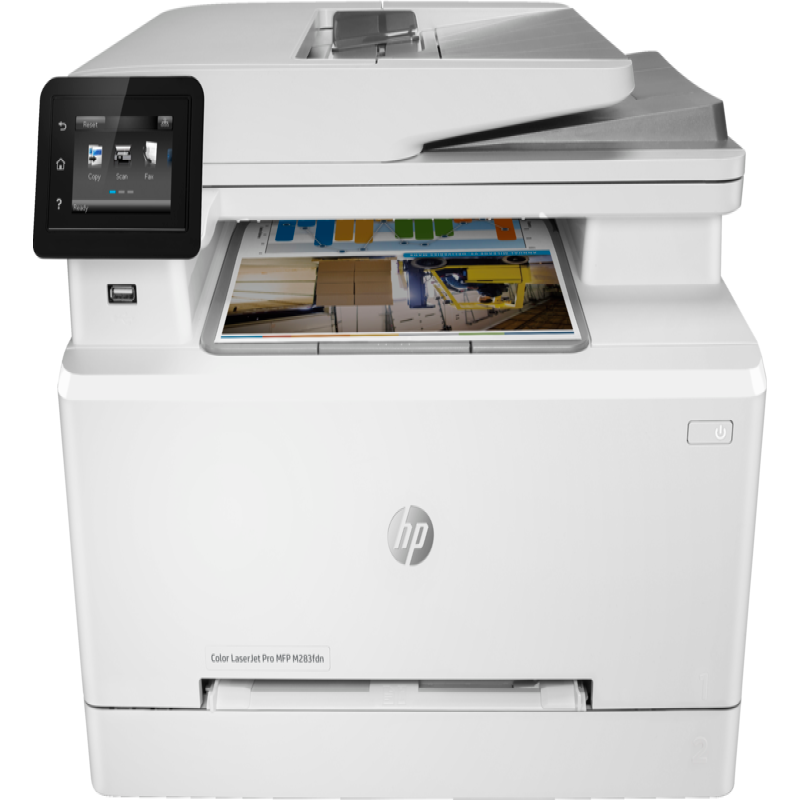
HP COLOR LASERJET PRO MFP M283FDN

₦695900 ₦765900
Functions: Print, copy, scan, fax Print speed black (ISO, A4): Up to 21 ppm Print Speed Color (ISO): Up to 21 ppm First page out color (A4, ready): As fast as 12.3 sec Duplex printing: Automatic (standard) Duty cycle (monthly, letter): Up to 40,000 pages Duty cycle (monthly, A4): Up to 40,000 pages Recommended monthly page volume: 150 to 2,500 Print quality black (best): Up to 600 x 600 dpi Print quality color (best): Up to 600 x 600 dpi Print languages: HP PCL6; HP PCL5c; HP postscript level 3 emulation; PWG raster; PDF; PCLm; PCLm-S; NativeOffice; URF Print technology: Laser Connectivity, standard: Hi-Speed USB 2.0 port; Built-in Fast Ethernet 10/100/1000 Base-TX network port; Fax port; Front Host USB Mobile printing capability: HP ePrint; Apple AirPrint™; Mobile Apps; Mopria™ Certified Network capabilities: Yes, via built-in 10/100/1000 Base-TX Ethernet; Auto-crossover Ethernet; Authentication via 802.1X Minimum System Requirements for Macintosh: Apple® macOS Sierra (v10.12), macOS High Sierra (v10.13), macOS Mojave (v10.14), macOS Catalina(v10.15), 200 MB available hard disk space, Internet required for download, USB Functions: Print, copy, scan, fax Print speed black (ISO, A4): Up to 21 ppm Print Speed Color (ISO): Up to 21 ppm First page out black (A4, ready) As fast as 10.6 sec ( First page out color (A4, ready) As fast as 12.3 sec Duplex printing: Automatic (standard) Duty cycle (monthly, letter): Up to 40,000 pages Duty cycle (monthly, A4): Up to 40,000 pages Recommended monthly page volume: 150 to 2,500 Print quality black (best): Up to 600 x 600 dpi Print quality color (best): Up to 600 x 600 dpi Print languages: HP PCL6; HP PCL5c; HP postscript level 3 emulation; PWG raster; PDF; PCLm; PCLm-S; NativeOffice; URF Print technology: Laser Connectivity, standard: Hi-Speed USB 2.0 port; Built-in Fast Ethernet 10/100/1000 Base-TX network port; Fax port; Front Host USB Mobile printing capability: HP ePrint; Apple AirPrint™; Mobile Apps; Mopria™ Certified Network capabilities: Yes, via built-in 10/100/1000 Base-TX Ethernet; Auto-crossover Ethernet; Authentication via 802.1X Minimum System Requirements for Macintosh: Apple® macOS Sierra (v10.12), macOS High Sierra (v10.13), macOS Mojave (v10.14), macOS Catalina(v10.15), 200 MB available hard disk space, Internet required for download, USB Minimum System Requirements: Windows® 10, 8.1, 8, 7 (32/64-bit): 2 GB available hard disk space, CD-ROM/DVD drive or Internet connection, USB port, Internet Explorer. Windows Vista® (32-bit): 2 GB available hard disk space, CD-ROM/DVD drive or Internet connection, USB port, Internet Explorer 8. Windows® XP SP3 or higher (32-bit only): any Intel® Pentium® II, Celeron® or 233 MHz compatible processor, 850 MB available hard disk space, CD-ROM/DVD drive or Internet connection, USB port, Internet Explorer 8. Windows Server support is provided via the command line installer and supports Win Server 2008 R2 and higher. Digital sending standard features: Scan to email; Scan to folder; Scan to USB drive Display: 6.8 cm (2.7 in) colour graphic screen Processor speed: 800 MHz Maximum Memory: 256 MB DDR, 256 MB Flash Paper handling input, standard: 250 sheet input tray Finished output handling: Sheetfeed Media sizes, custom: 76 x 127 to 216 x 356 mm File Format Supported: PDF; JPG Scanner type: Flatbed, ADF Scan file format: JPG, RAW (BMP), PNG, TIFF, PDF Enhanced scanning resolution: Up to 300 x 300 dpi (ADF); Up to 1200 x 1200 dpi (Flatbed) Automatic document feeder capacity: Standard, 50 sheets Duplex ADF scanning: No Scan technology: Contact Image Sensor (CIS) Automatic document feeder capacity: Standard, 50 sheets Duplex ADF scanning: No Scan technology: Contact Image Sensor (CIS) Maximum dimensions (W x D x H): 424 x 475 x 338 mm
Categories: Printers Brand: HP SKU: Not available
Share :

Description
Get extraordinary, wireless performance and fast multifunction versatility with the H P Color LaserJet Pro M283fdw Wireless All-in-One Laser Printer. This color laser printer lets you easily print and scan from your mobile device with H P Smart, H P's best-in-class mobile print app; plus, automate repetitive tasks and organize documents 50% faster with exclusive office features in the H P Smart app. Breeze through tasks with print, scan, copy, and fax capabilities, print speeds up to 22 ppm, and an easy-to-use 2.7" color touchscreen. Stay productive with this wireless printer's 250-sheet input capacity and 50-page automatic document feeder. And, keep your office connected and protected with this H P LaserJet printer's dual-band Wi-Fi and strong security designed to detect and stop attacks.

Features & details
Big multifunction performance with high-quality color: This wireless all-in-one printer features print, copy, scan, and fax versatility, fast print speeds––up to 22 ppm, automatic two-sided printing, and a 50-page automatic document feeder
Print remotely with the H P Smart app: Set up your LaserJet printer, manage print jobs, receive notifications, and print and scan on the go with H P Smart––H P's best-in-class mobile print app
Save time with customizable shortcuts: Eliminate steps in repetitive tasks and organize documents 50% faster directly from your mobile device using exclusive office features in the H P Smart app
Strong security: Help protect your H P office printer and sensitive business data with built-in security essentials that help detect and stop attacks
Wireless connectivity you can count on: Have confidence in your printer's connection with steady performance from dual band Wi-Fi
JetIntelligence value: Count on Original H P Toner cartridges with JetIntelligence to enable professional-quality pages, peak printing performance every time, and protection against counterfeits with innovative anti-fraud technology

My Cart
Cart Page
My Wishlist
Wishlist Page

We may use cookies or any other tracking technologies when you visit our website, including any other media form, mobile website, or mobile application related or connected to help customize the Site and improve your experience. Learn more

Allow